Capabilities · Last updated November 16, 2026
AI video analyzer for AI agents.
UseTrawsn is an AI video analyzer for agent workflows. Give video-read one URL or local recording and ask a specific question; it returns text the agent can use, such as reproduction evidence from a bug recording, key events from a demo, or a checkpoint before the next action.
A real video-read run on a production clip
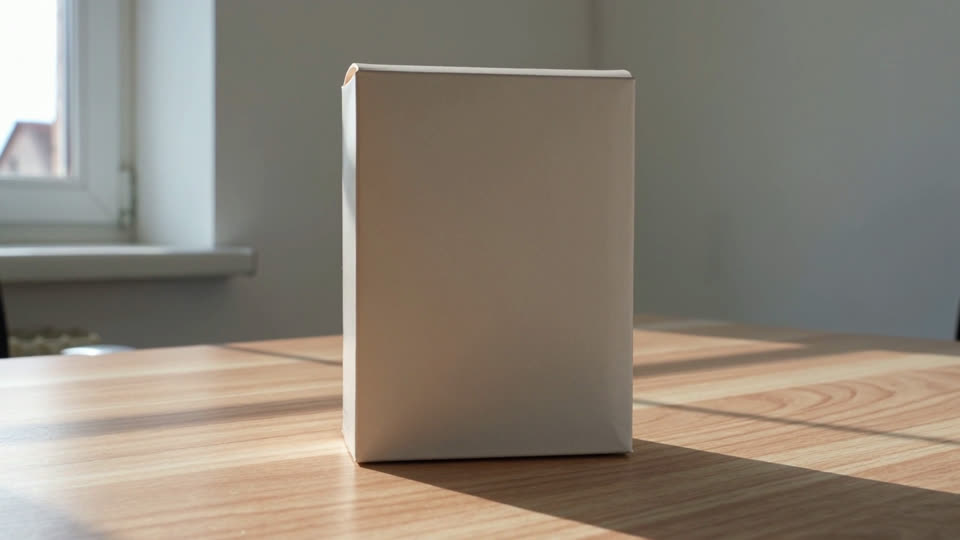
On September 29, 2026, the Codex desktop app ran the UseTrawsn CLI against the production API. It generated a five-second product clip with Kling 3.0, then asked video-read three questions about that file: how the camera moves, whether any text on the box is legible, and which artifacts are visible. This run was in Codex, not Claude Code; Claude Code runs the same CLI command.
The clip came from Kling 3.0 text-to-video in the same session (5 seconds, 16:9, 1080p, generate_audio=false). The prompt asked for a blank cream product box on an oak desk, a slow straight push-in, no cuts, and no added text or logos. That generation was charged 17 credits, separately from the analysis below.
Command as run
usetrawsn --endpoint https://api.usetrawsn.ai actions video-read --file ./codex-demo.mp4 --instruction 'Respond entirely in English. Analyze this video for three things: (1) Describe the camera movement throughout, distinguishing camera motion from product motion. (2) Is any text on the product box legible? Transcribe only text you can confidently read and explicitly identify uncertain or unreadable text without guessing. (3) Describe visible artifacts, including warping, flicker, jitter, inconsistent geometry, text distortion, blur, or other temporal inconsistencies. Give approximate timestamps where useful, distinguish observations from uncertainty, and keep the response concise.'Verbatim content returned by video-read (unedited)
[Video: H264 | 5.0s | 1920x1080 | 24fps | no audio | 8572kbps]

**1. Camera Movement vs. Product Motion:**
* **Camera Movement:** The camera executes a smooth, continuous push-in (dolly/forward zoom) centered directly on the box, moving closer to it from 00:00 through 00:05.
* **Product Motion:** The box remains stationary on the wooden table throughout the clip; there is no translation or rotation of the product itself.

**2. Text Legibility:**
* **Text on Box:** None. The box surfaces (front, side, and top) are entirely blank, plain cardboard packaging with no visible or legible text, logos, or markings.

**3. Visible Artifacts & Inconsistencies:**
* **Subtle Warping / Edge Morphing (approx. 00:02–00:05):** As the camera pushes closer, slight AI-generation temporal inconsistencies are visible along the top flap folds and upper contours of the box, where the seam geometry subtly shifts and flexes rather than maintaining a completely rigid edge.
* **Flicker/Jitter/Blur:** No pronounced temporal flicker, text distortion, or extreme motion blur is observed; the table grain and background lighting remain relatively stable and static throughout.- Date
- September 29, 2026 · production API (api.usetrawsn.ai)
- Host
- Codex desktop app (0.158.0-alpha.2.1) running UseTrawsn CLI 0.6.3. Not a Claude Code session; Claude Code runs the same CLI command.
- Input
- The local file, sent with --file; the CLI uploads it before analysis. No --model flag, so the default video-read model answered.
- Result
- status: success · credit_cost: 10, the fixed price per successful video-read request
- CLI time
- About 18 seconds for the whole command, upload included
- Sample
- One run, one instruction, no retries
At the Starter pack rate ($10 for 500 credits, $0.02 per credit), 10 credits is about $0.20 per successful request. Every success reports its actual charge as credit_cost. See UseTrawsn pricing.
Can Claude watch videos?
Not directly. Claude takes text and images, and Anthropic's upload docs list no video formats. A pasted transcript gives Claude the speech but not the picture; a few screenshots give it the picture but not what happens between them. From Claude Code, UseTrawsn video-read sends the whole video to a model that can watch it, and Claude gets the answer back as text.
| What you need | Claude on its own | Claude Code + UseTrawsn |
|---|---|---|
| Analyze a local recording or screen capture | No. Video isn't an accepted file type. | video-read --file uploads the recording first, up to 100 MB per file. |
| Analyze a hosted video | No. Claude only sees text you paste, like a transcript. | video-read --url with a direct link to the video file. |
| Follow what happens on screen: UI states, motion, event order | Only through screenshots you take and attach. | A focused --instruction returns events, defects or a summary as text. |
| Spoken content only | Works when you paste a transcript. | video-read on the video, or audio-read on an extracted audio track. |
1. Install once and sign in
npx -y skills add usetrawsn-ai/usetrawsn -a claude-code -y curl -fsSL https://usetrawsn.ai/install.sh | sh usetrawsn login2. Ask a specific question; Claude Code runs video-read
usetrawsn actions video-read --file ./bug-report.mp4 --instruction "List the reproduction steps with timestamps"In Claude Code, a request like "Watch ./bug-report.mp4 with UseTrawsn and list the reproduction steps with timestamps" produces this command. A narrow question gets a better answer than "analyze this video". Each successful request costs 10 credits and returns text; spot-check timestamps against the recording before you rely on them.
Checked November 2, 2026 against Anthropic's upload documentation and models overview.
How we checked the video-read answer
We compared the recorded response with ffprobe output and with frames extracted from the same file. Metadata and framing are independently checked; the subtle artifacts are the model's report.

| What video-read said | How we checked it | Result |
|---|---|---|
| Header: H264, 5.0s, 1920x1080, 24fps, no audio, 8572kbps | ffprobe on the published file: h264, 1920 × 1080, 24 fps, 5.041667 s, one video stream and no audio stream, overall bit rate 8,572,778 b/s. | Matches (duration rounded). |
| Smooth push-in from 00:00 to 00:05; the box itself does not move | Compared the 0 s and 4 s frames: the box is clearly larger at 4 s and the chairs have nearly left the frame, while the box stays upright in the same spot on the desk. | Consistent. Two frames show the framing change, not the smoothness; play the clip for that. |
| No text, logos or markings on the box | Looked at the box faces in the 0 s and 4 s frames. | Consistent: the visible faces are blank in both. |
| Subtle warping along the top flaps and seams, about 00:02–00:05 | Two still frames can't show subtle frame-to-frame warping, and we did not review the clip frame by frame. | Reported by the model; not confirmed or ruled out by us. |
| No pronounced flicker, jitter or heavy blur | Not checked frame by frame. | Reported by the model; not independently verified. |
What this example does not show
- One clip, one run, one instruction. It says nothing about repeatability, accuracy across many videos, or typical latency.
- The clip is short, synthetic and nearly static. It is not a screen recording, real camera footage or a long video, so the bug-recording use cases on this page were not tested by this run.
- The clip has no audio track, so speech and sound analysis were not exercised.
- Timestamps come from the model and are approximate. Check them against the video before you rely on them.
- A local file sent with --file can be at most 100 MB. For longer recordings, trim or split the video and analyze the parts separately.
Call video-read over HTTP
Send a public video URL and an instruction with an API key from your UseTrawsn dashboard. The answer is in data.content, and data.credit_cost reports the charge. For a local file, first request an upload from POST /v1/capabilities/presign, upload the file, and pass the returned object_url (an usetrawsn://upload/... reference) as url; the CLI does this for you.
POST /v1/capabilities/video/read
curl -sS https://api.usetrawsn.ai/v1/capabilities/video/read \
  -H "Authorization: Bearer $USETRAWSN_API_KEY" \
  -H "Content-Type: application/json" \
  -d '{
    "url": "https://usetrawsn.ai/content-evidence/codex-production-20260929/codex-text-to-video.mp4",
    "instruction": "Describe the camera movement and any legible text on the box."
}'Request and response fields checked against the UseTrawsn API server source on November 16, 2026. We did not send this exact request; the run above used the CLI.
Use a focused instruction
Ask for the evidence you actually need: visible defects, timestamps, event order, or a concise summary. A narrow instruction produces a more useful result than a generic request to analyze the video.
- The action accepts one video URL or one uploaded local file and an optional instruction or model.
- The CLI returns analysis content with request context instead of exposing provider-specific response fields.
- The same result can support quality review, content extraction, or a checkpoint before another agent action.
Checked in the current CLI · CLI help verified October 21, 2026
Video analysis accepts a URL or a local file.
We rechecked the video-read help output in UseTrawsn CLI 0.6.5 on October 21, 2026. It accepts one remote URL or one local file, plus an optional instruction for a focused answer. This confirms the command interface; the recorded production run on this page shows a real response, while the sample response shape remains illustrative.
- Remote input
- One video URL
- Local input
- One uploaded video file
- Instruction
- Optional focused analysis prompt
- Successful request
- 10 credits
usetrawsn actions video-read --helpIllustrative response shape, not a recorded run — 10 credits per request
Inspectable output
{
  "status": "success",
  "content": "The recording shows the checkout modal clipping its submit button on a narrow viewport.",
  "credit_cost": 10,
  "request_id": "req_abc123"
}
This is a representative response shape, not a guarantee that every request returns the same content. The content changes with the input and instruction; operational fields may vary by server response.
CLI usage and an illustrative response shape
Analyze a remote video
usetrawsn actions video-read --url https://example.com/demo.mp4Analyze a local recording
usetrawsn actions video-read --file ./recording.mp4Ask a focused question
usetrawsn actions video-read --url https://example.com/demo.mp4 --instruction "Identify the visible checkout defect"Illustrative response shape, not a recorded run — 10 credits per request
{
  "status": "success",
  "content": "The recording shows the checkout modal clipping its submit button on a narrow viewport.",
  "credit_cost": 10,
  "request_id": "req_abc123"
}How video analysis fits the workflow
Provide
Give the action one remote video URL or one local file. Local files are uploaded before analysis.
Direct
Use --instruction when the agent needs a focused result such as a defect, event list, or checkpoint decision.
Continue
Use the returned content in the next review, document, generation, or automation step and retain request context for support.
Three ways agents use video analysis
Quality review
Inspect a bug recording or recorded test session for visible defects, reproduction evidence, and UI behavior.
Content extraction
Turn a demo, walkthrough, or research clip into a summary, event list, or focused observation.
Workflow checkpoint
Confirm that a recorded step reached the expected state before the agent writes, routes, or generates the next artifact.
FAQ
Can Claude Code analyze a video file?
Yes, through UseTrawsn. Claude Code runs usetrawsn actions video-read --file with a focused --instruction. Local files up to 100 MB are uploaded first, and each successful request costs 10 credits.
What does the video-read action accept?
Provide either one --url or one --file. A local file is uploaded first and must be no larger than 100 MB. You can also add --instruction or select a model.
Why is the command named video-read?
video-read is the UseTrawsn action for analyzing video content. It sends the supplied video and optional instruction to the video read capability and returns the analysis as structured CLI output.
Which fields can the CLI return?
Every successful video-read request costs 10 credits and includes credit_cost: 10. The response also includes status and content; request_id appears when the server supplies one, and the top-level CLI normally adds trace_id. Additional operational fields may appear.
Can an agent ask a focused question about a recording?
Yes. Pass --instruction to request a specific observation, summary, event list, or review finding instead of a general description.
Ask the recording a useful question.
Provide the video, name the evidence you need, and pass the answer to the review or task that prompted it.
CLI version and updating · 0.6.5
Current release checked October 21, 2026: 0.6.5. Use the update command for your installation method, then verify the version and login in the same environment that runs your agent.
Direct binary installation
usetrawsn updatenpm installation
npm install -g @usetrawsn/cli@latestusetrawsn --version
usetrawsn statusVersion 0.6.5 retries transient downloads, recovers an expired video link by querying the same task, and saves multiple image outputs to numbered files. After a video download failure, resume the existing task instead of generating again.
usetrawsn video tasks wait <task-id> -o result.mp4Dated examples retain the CLI version, output and charge from the original run. Updating the CLI does not revalidate an old result. Check the live model schema and current pricing before a new billed task.